• Overview
  • Technical Specifications
  • Performance

Simple SSD Upgrade Solutions

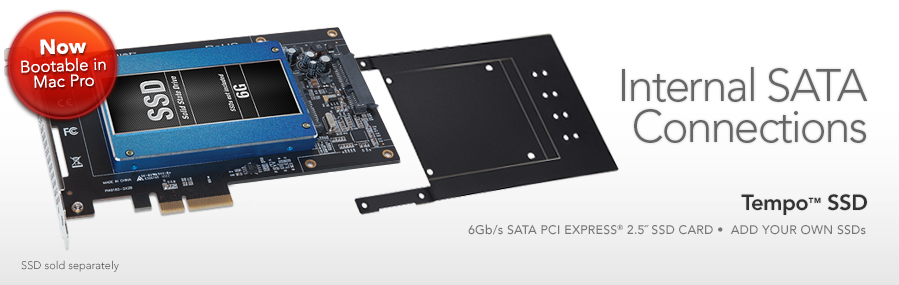
If you’ve been thinking about fast, bootable storage, you’ve read the stories and seen the reviews; SSDs are hot right now. Not only do they offer tremendous performance and easily outperform hard disk drives, they are more reliable, their prices are dropping and you can get more capacity than ever. If you’ve got a Mac Pro® or older Windows® desktop computer, you could just get a couple of 2.5” SSDs (plus necessary adapters) and install them in some empty drive bays (if there are any) and be done with it—but the 3Gb/s SATA interface in your computer won’t support fast 6Gb/s SSDs at full speed. You could also get a 6Gb/s eSATA adapter plus external mount SSD storage, but they come with the excess baggage of power adapters and cable clutter. Sonnet engineered a great alternative—Tempo™ SSD. It's a fast 6Gb/s SATA PCI Express adapter card that enables you to attach readily available 2.5" SSDs and install the assembly neatly into a single PCIe slot, no cables or drivers necessary.

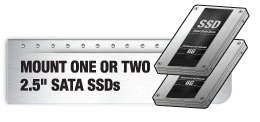
Mount 1 or 2 2.5" SATA SSDsUnlike other PCI Express SSD cards that rely on proprietary, premium priced SSD modules, Tempo SSD uses standard 2.5" SATA drives that you choose. You get to select from the widest variety of SSDs, and buy the ones that best suit your capacity and performance needs while working within your budget. Because 2.5" SSDs are readily available, you’re not tied to one retailer or SSD manufacturer should you decide to upgrade to higher capacity, faster SSDs.

Two Models to Choose FromTempo SSDTempo SSD Pro

Tempo SSD Key Features

Mounts one or two high-performance 6 Gb/s SSDs (sold separately) in your Mac Pro's, desktop PC's, or Thunderbolt expansion chassis' PCIe slot

PCI Express 2.0 x2 host bus interface for high-performance applications

Great performance with data transfers speeds up to 660 MB/sec

Unique modular design enables installation of a single SSD in half length card spaces, two SSDs in full length card space when extension plate is attached to the card

Optimized for maximum performance over Thunderbolt—perfect for use in Sonnet's Echo Express and xMac mini Server Thunderbolt expansion products

Supports OS X and Windows RAID features

Supports booting from attached drives under OS X or Windows 7 and 8 (see Tech Specs for details).

AHCI compliant—no drivers required

Supports S.M.A.R.T. data reporting

Shadow

A Card with Room to Grow

Tempo SSD features a unique modular design that grows with your needs. Out of the box, this Sonnet solution is a half-length, full-height card to which you attach one SSD. It’s small enough to fit in most spaces, perfect for installing a single SSD into your system. With the included extension plate attached, the Tempo SSD is transformed into a full-length card to which you can install an additional SSD. Adding the second SSD allows you to improve performance or data security by exploiting OS X® or Windows® RAID features. This card uses a fast 6 Gb/s SATA controller chipset and PCIe 2.0 x2 interface to deliver read speeds up to 660 MB/s from a pair of SSDs configured as a RAID 0 set. AHCI compliance ensures installation of the card is simple—attach your SSDs with provided screws, mount the card in an available PCIe slot, and turn on your computer—the necessary drivers are installed automatically. Drive health monitoring is supported through S.M.A.R.T. data reporting.

Tempo SSD with Bracket

Add More to the Plate: The included extension plate allows you to add a second SSD to expand your storage needs.

Thunderbolt™ Port? Instant SSD Solution

Got a Thunderbolt connection, but no PCIe slot? Tempo SSD Pro is ideal for use in Sonnet's Echo™ Express Pro Thunderbolt™ Expansion Chassis for PCIe Cards or the xMac™ mini Server PCIe 2.0 expansion system/1U rackmount enclosure for Mac mini with Thunderbolt ports—the combo enables you to add high-speed SSDs to iMac®, Mac® mini, MacBook® Air, and MacBook Pro computers!

MacBook Pro with Echo Express Pro Chassis

Add High-Speed SSD Drives to Your Thunderbolt Equipped Mac: Install SSD drives onto a Tempo SSD Pro and install the card into a Sonnet Echo Express Pro chassis for super fast access to all your data.

Tempo SSD Configuration Ideas


Part No.  
TSATA6-SSD-E2 Tempo SSD 6Gb/s SATA PCIe 2.0 Drive Card for SSDs(1)
Hardware  
Warranty 1-year
Internal Connectors Two SATA
Drives Supported  

SATA 6 Gb/s, SATA 3 Gb/s, and SATA 1.5 Gb/s  

Data Transfer Rate Up to 660 MB/s(2)
Firmware Flash-ROM upgradeable to latest firmware version
Boot Support

Single SSD or up to six SSDs in a RAID 0:

  • Mac Pro 3,1 (early 2008 and newer)(4)
  • Any Thunderbolt Mac

Single SSD only:

  • Windows 7 or 8 PCs(3)
Advanced Features Supports S.M.A.R.T. status data reporting
RoHS Compliant Yes
Package Contents
  • Tempo SSD 6Gb/s SATA PCIe 2.0 Drive Card for SSDs
  • Extension plate (for mounting second SSD)
  • Plate and drive mounting screws
  • Documentation

    Note: SSDs sold separately


Mac LogoWindows LogoPCI Express LogoroHS Logo


Mac Compatibility

Mac Pro(5)

Any Thunderbolt Mac with Thunderbolt PCIe expansion chassis (such as Sonnet's Echo Express Pro, Echo Express, or Echo Express SE)

OS X® 10.6.8+

OS X Server 10.6.8+

OS X Server and OS X Mountain Lion compatible

Windows Compatibility

PC (with PCIe slots)

Windows® 8, Windows 7, Windows Vista®

Thunderbolt Compatibility

Any computer with a Thunderbolt port and Thunderbolt PCIe expansion chassis (such asSonnet's Echo Express Pro, Echo Express, or Echo Express SE)

Sonnet's xMac mini Server


Technical Notes

  1. SSDs sold separately.
  2. See Performance Tab for details.
  3. Windows BIOS does not support booting from a RAID 0 of multiple SSDs.
  4. Booting in OS X requires card with serial number starting with "B". Firmware updater for "A" serial number boards available soon.
  5. Tempo SSD Pro is recommended for Ma Pro 1,1 2,1 and 3,1 instead of Tempo SSD. These early Mac Pros have PCIe 1.1 slots which will negotiate the two-lane Tempo SSD card down to one lane. These early Mac Pros will correctly negotiate with the four-lane Tempo SSD Pro.


Specifications subject to change without notice.


Tempo SSD Pro & Tempo SSD Performance Comparison
One SSD Mac Pro Read Write
Tempo SSD Pro 500 MB/s 420 MB/s
Tempo SSD 500 MB/s 420 MB/s
Shadow
One SSD with Mac Pro Performance Chart
 
One SSD Thunderbolt Read Write
Tempo SSD Pro 450 MB/s 325 MB/s
Tempo SSD 450 MB/s 325 MB/s
Shadow
One SSD with Thunderbolt Performance Chart
 
Two SSDs Mac Pro Read Write
Tempo SSD Pro 960 MB/s 810 MB/s
Tempo SSD 660 MB/s 540 MB/s
Shadow
Two SSDs with Mac Pro Performance Chart
 
Two SSDs Thunderbolt Read Write
Tempo SSD Pro 700 MB/sec 560 MB/sec
Tempo SSD 600 MB/sec 380 MB/sec
Shadow
Two SSDs with Thunderbolt Performance Chart